Scans and updates old drivers

Driver Easy is a driver updater program designed for Windows devices. It scans all available device drivers, reports the ones that are missing or out-of-date, and offers to repair them quickly. The software comes with a clean, beginner-friendly interface that allows you to download all outdated drivers one by one. You can even schedule scans and update drivers manually. This tool is free to download and available for both 32 and 64-bit Windows desktops.

What is Driver Easy?

Driver Easy is a Windows software that helps users detect old or corrupted drivers and offers to repair them. It consumes less than twenty percent CPU and disk space when active and hardly impacts the system’s performance. The software is free to download and works on all Windows devices including Windows 10.

It consists of a library of over 8 million certified drivers, sourced directly from hardware manufacturers. These drivers are thoroughly tested before getting updated on your device so that none of them lead to malicious activity once they’re installed.

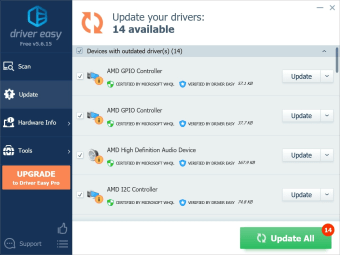
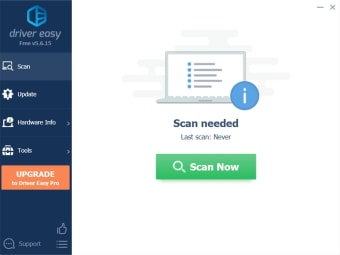
The driver updater software runs a scan of your system to find drivers that cause problems or no longer support the system hardware. Once the scan is complete, Driver Easy lists all the available device drivers. You can either update each driver manually or select the automatic function to update all drivers one after another.

Why do I need a driver updater?

Device drivers are software solutions using which Microsoft Windows communicates with the device’s hardware. When you use old or corrupted drivers, you face performance issues, system lags, and bugs. To avoid this situation, you must update all the drivers available on your device.

While most drivers get updated in the background, some continue to run on older versions. However, looking for a driver online can be a confusing and tedious task. By using driver updater programs like Driver Easy, you can get easy access to all the latest versions of drivers and update them simultaneously with little effort.

Beginner-friendly dashboard

You don’t have to be tech-savvy to use Driver Easy! The program comes with an easy-to-use dashboard that allows you to update all your drivers one by one. It also has enough features to help you scan, flag, and repair system drivers. For added functions, you can opt for the program’s paid version called Driver Easy Pro.

Driver Easy gives you the option to scan all your drivers or schedule a monthly scan to ensure you’re always using the latest versions. It shows you a list of drivers that get flagged as old or corrupted. You can either update each one manually or run an automatic update command from the dashboard.

Offers system and driver information

When you use Driver Easy, you’re given a comparison of the installed driver and the driver you should install. This comparison consists of the name of the driver, provider, release date, file size, as well as the version of the latest available driver.

The software also provides information on the different components of the Windows device. It allows users to get essential information about the motherboard, graphics card, video card, network card, and CPU. Since it provides this data to users, it is also considered a system information tool.

Comes with an intuitive scheduler

One of the best things about Driver Easy is that it comes with an advanced scheduler that is customizable to user requirements. You can set the scan to start at any time of the day, including when your computer is sitting idle. You can also schedule scans for when you log in or out of your Windows device.

Additionally, Driver Easy can wake your computer up and run scans at a particular time. You can set the scan to stop if your computer detects a change in the power source and starts running on batteries. Once the scan is complete, the software downloads the drivers in the background.

Downloads drivers for you

While Driver Easy quickly finds the latest versions of all available drivers, it does have two drawbacks. First, the free version of the software only downloads drivers, you have to complete the installation yourself. Features like auto restore, backup, one-click download, and auto-installation are also limited to the premium version.

The second drawback is that the downloading speed is 40 - 80 KB, which is a lot slower than what you would get if you opted for the paid version. Moreover, you can’t use the free version to automatically update all drivers or use it for commercial purposes. The free version also lacks PC tech support.

Is Driver Easy a virus?

No, Driver Easy is free of any malware or threats and isn’t a virus. The software only downloads certified drivers on your system and doesn’t get flagged by Windows Defender.

Is Driver Easy free and safe?

Yes, Driver Easy is both free and safe to use. However, the free version of the software provides limited functions and features. Apart from scanning and downloading device drivers one by one, the free Driver Easy program isn’t as comprehensive. If you want additional features, you will need to upgrade to the premium version.

Are there any alternatives?

Driver Easy is a good software program when it comes to updating drivers and getting system information. However, the free version does have its fair share of pros and cons. If you’d like to check out alternatives, you should explore Driver Booster Free, SlimDrivers, and Driver Genius Professional.

Is Driver Easy any good?

If you’re looking for an easy-to-use driver updater, you should give Driver Easy a try. It has essential features needed to keep your system drivers up-to-date. While you may have to manually install the drivers, you won’t have to find them.

Driver Easy scans and provides a list of recommended and certified drivers that you can download for better system performance. Moreover, once you get familiar with the software, you can get additional features by upgrading to the paid version.


  • Pros

    • Downloads only certified drivers
    • Quick scanning process
    • Comes with a scheduler
  • Cons

    • Drivers have to be manually installed
    • Many features limited to the paid version
 0/2

App specs

Program available in other languages


Icon of program: Driver Easy

Driver Easy for PC

  • Free
  • 3.6
    3740
  • 1.3M
  • V6.1.2.29728

User reviews about Driver Easy

3.6

41 reviews

Add review

Main reviews for you

  • Anonymous user

    I really recommend Driver Easy, I had problems finding the correct drivers for my GPU until I found this app. It takes a few clicks and you just have to sit back and relax until the drivers are done updating. other apps failed to give me all the driver updates I needed unlike this one. I would also add that I consider the Pro version very affordable and worth for 3 devices for one whole year

  • Anonymous user

    I am a very happy and regular user for the DRIVER EASY software because I am using a Acer Laptop which is almost 8 years old now. Thanks to this software for helping me keep it going as it is very much unaffordable to keep buying new laptops for me.The user interface and the ease of use is very commendable and sincerely appreciate the designers and developers to making the life of users so easy and trouble free. Every time I run the Acer utility in my laptop to check the health…it scans my laptop and gives me a clean chit saying all the drivers are upto date. Infact I have a Acer V17 Nitro which is a high end version. Driver easy has been my saviour for the last few years in keeping my laptop upto date. Thanks once again for the great job.

  • Anonymous user

    This Software is the best software that I have ever found that make us easy to keep our driver up to date with its user-friendly interface. Driver easy also offers an extensive driver database ensuring that it covers a wide range of hardware components. Based on my experience, Driver easy is very useful to solve some problems such bluescreen issue etc. and made functions in my device (Laptop) work optimally. On the other hand, the Driver easy automatic update feature also will make us easier to update the driver with one click so we won't be confused about which driver will be updated and make us don’t need to search for the driver manually and install it manually. After researching more about Driver easy, I found another feature that makes us won't be afraid if we make mistake during updating the driver. It is a backup and restore functionality feature. Backup Driver Easy provides a seamless solution, allowing us to create backups of their drivers before making any updates.Overall, Driver Easy has earned its place as my go-to software for driver management. It strikes the perfect balance between simplicity and functionality, making it accessible for users of all levels of expertise. Let the driver easy works! Happy update!

  • Anonymous user

    Driver easy is the best automatic driver installing tools i have been using it since 1 month and it kept all my drivers up to date it also provides features such as easy back up and automatic restore points. it also have very high speed downloads with trusted and verified drives from trusted brands. it also install drivers automatically which is very good for newbie if they dont know how to download driver themselves. There is huge data base of drivers. you can get you pc up to date with driver easy and make it run faster. since new drivers are better in performance.Overall, Driver Easy is a useful tool for keeping device drivers up-to-date and improving system performance. Its user-friendly interface and large driver database make it a convenient choice for both novice and advanced users.

  • Anonymous user

    One of the best and easiest Driver updater in the market, while it's not free its free version is still very comfortable to use since you don't have to pay to use it fully, while it's more time-consuming and tedious I still believe it to be one of the full version in it's free version and it's very user friendly since I didn't knew how to change drivers or something like that and the app explained it with a lot of detail so I was able to learn how to use it without a lot of trouble, I believe it can improve a bit in the part of changing the drivers in the free version but other than that I loved the app and hope they can continue updating it to help more users like me that didn't know anything about drivers, I can proudly say that I will recommend the app to my friends and family. Overall I enjoyed the app and all its features so I hope it continues to be the best app in the driver updaters category and the developers continue putting in the same effort that when the app was released and the new updates make the app even greater than it is actually.

  • Anonymous user

    Driver easy is very easy,fluent and quick to use.From the friendly UI and quick installation it means you can easily use Driver Easy with no problems or errors.Its a stable program and I have never come into any viruses or bugs having had it for over a year now and Im happy to recommend it to friends and family.Other than this is also can install my nvidia 2070 driver, which im constantly using to play games such as Control,Apex legends, Cyberpunk and many others, straight from the program! Rather than opening geforce experinece with a clunky UI so having everything in one place is so easy and straightfoward.As well as this it gives you hardware info of your computer so if you were unsure about the specs of your PC it can be displayed right in the program.Furthermore with things like driver restores if anything were to go wrong which would be very unlikely to, the previous update of the drivers can be restored and fully functioning.This is why I persoanlly give it 5 stars just because of the pure ease I have when using it to keep my computer up to date as well as my families computers

More

You may also like

Alternatives to Driver Easy

Explore Apps

Latest articles

Laws concerning the use of this software vary from country to country. We do not encourage or condone the use of this program if it is in violation of these laws.
Softonic

Is Driver Easy safe?

99/100

Score result: Clean

This file passed a comprehensive security scan using VirusTotal technology. It is safe to download.

  • Virus free
  • Spyware free
  • Malware free
  • Verified by Security Partners

    VirusTotal logo

Scan Info

Last scan
Wednesday, July 23, 2025
Scan provider
VirusTotal · Full report

File Integrity

File
Driver_Easy_V6.1.2.29728.exe
SHA256
fae2cdcb8b566128ca110cf9bad3eb604542603add5de1a3676d6f75078d3f67
SHA1
c1bfdbbc6f4606ff7521a4eb44c6561bd5de725c

Softonic security commitment

Driver Easy has been thoroughly scanned by our advanced security systems and verified by industry-leading partners. This file comes from the official developer and has passed all our security checks, showing no signs of viruses, malware, or spyware. For more information, visit our Security and Trust Center